
You launch a new website, expecting visitors to flock in, but instead, they leave immediately. Why? A glaring “Not Secure” warning sits right next to your domain name in their browser. If you want to build trust and keep your visitors’ data safe, you must fix this issue immediately.
To remove that warning and protect your traffic, you need to buy SSL certificate protection. Figuring out which one to get and how to install it can feel confusing at first.
This guide removes the guesswork from website security. We will explain exactly what this technology does, why your website cannot survive without it, and how to purchase the perfect option for your specific needs.
What is an SSL Certificate?
SSL stands for Secure Sockets Layer. An SSL certificate acts as a digital passport for your website. It authenticates the identity of your website and creates an encrypted connection between your web server and your visitor’s browser.
When you buy SSL certificate protection, you ensure that any data passing between your site and your users remains private. If a user types in their password or credit card number, the certificate scrambles that data into an unreadable format.
Even if a hacker intercepts the connection, they will only see a random string of useless characters. This simple digital file forms the backbone of internet security.
Why Buying an SSL Certificate is Essential for Websites
You might think only massive online retailers need to worry about encryption. The truth is that every single website needs this protection. Operating without one puts your business and your visitors at risk.
It Builds Instant Visitor Trust
Browsers like Google Chrome and Apple Safari take user safety very seriously. If you do not have an active certificate, browsers will actively warn users away from your website. A bright “Not Secure” label destroys your credibility before a visitor even reads your content. When you buy SSL certificate protection, you get a reassuring padlock icon instead.
It Protects Sensitive User Data
If your website has a contact form, a login page, or a checkout system, you collect data. You have a strict responsibility to protect that information from cybercriminals. Encryption ensures that malicious actors cannot steal your visitors’ personal details while they browse your site.
It Boosts Your Search Engine Rankings
Search engines want to send their users to safe websites. Google openly uses HTTPS as a ranking signal in its search algorithm. If you want your website to appear on the first page of search results, installing an SSL certificate serves as a mandatory first step for your SEO strategy.
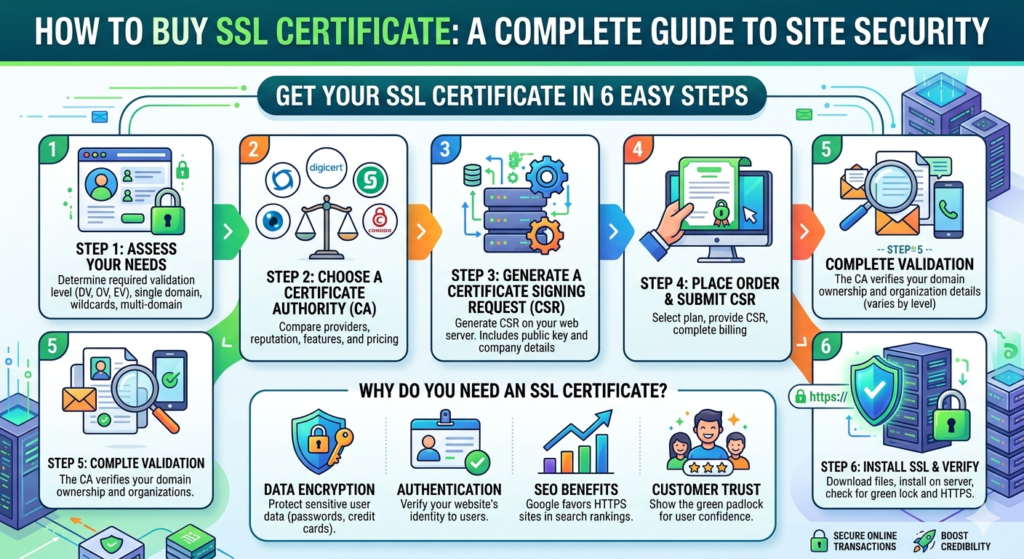
Steps to Buy an SSL Certificate
Purchasing and setting up your new security file takes just a few steps. Follow this simple process to get your website secured quickly.
Step 1: Choose Your Validation Type
First, decide what level of security you need. Domain Validation (DV) certificates are the easiest to get and only require you to prove you own the domain. Organization Validation (OV) and Extended Validation (EV) require the issuing company to verify your actual business details.
Step 2: Generate a Certificate Signing Request
Before you can buy SSL certificate files, you must generate a Certificate Signing Request (CSR) on your web server. This is a block of encoded text that includes your domain name and company details. Your web hosting provider can usually help you generate this file with a single click.
Step 3: Purchase and Validate
Take your CSR to your chosen certificate provider and complete the checkout process. The provider will then ask you to prove you own the domain. You can usually do this by clicking a link sent to your domain’s admin email address or by uploading a small text file to your server.
Step 4: Install the Certificate
Once the provider validates your domain, they will email you the final certificate files. You simply upload these files to your web hosting control panel. After installation, your website will officially load over a secure HTTPS connection.
Factors to Consider When Purchasing an SSL Certificate
Not all certificates offer the same value. When you get ready to buy SSL certificate coverage, keep these specific factors in mind to ensure you make the right choice.
Number of Domains and Subdomains
A standard certificate only covers one specific domain name. If you run a blog on your main domain and a store on a subdomain, you need a Wildcard certificate. A Wildcard covers your primary domain and an unlimited number of subdomains under it.
Warranty Offerings
Most paid certificates include a financial warranty. If a flaw in the certificate allows a hacker to steal customer data, the issuing authority covers the financial damages up to a certain amount. If you process credit cards directly on your site, look for a high warranty amount.
Customer Support Options
If you run into trouble during the installation process, you will want reliable help. Check the provider’s support options before you buy. Look for companies that offer 24/7 live chat or phone support so you can get your website secured without delays.
Top Providers to Buy SSL Certificates From
The market is filled with excellent security companies. Here are a few top-rated providers to consider when you are ready to make a purchase.
- Namecheap: Known for budget-friendly pricing, Namecheap offers excellent deals on basic DV certificates. They provide great customer support and make the checkout process incredibly simple.
- DigiCert: If you run a large enterprise or need maximum trust, DigiCert is a premium option. They specialize in high-end EV certificates and provide massive warranty levels.
- Sectigo: Formerly known as Comodo CA, Sectigo offers a massive variety of certificates. Whether you need a simple single-domain certificate or a complex multi-domain Wildcard, they have a reliable product.
- Your Web Host: Always check with your current web hosting company first. Many hosts allow you to buy SSL certificate upgrades directly through your hosting dashboard, which makes installation automatic.
Secure Your Website Today
You cannot afford to leave your website unprotected. Between search engine penalties and lost visitor trust, running an unsecured website costs you traffic and revenue every single day.
Take a look at your website structure, decide which validation level fits your business, and choose a reliable provider. Buy SSL certificate protection today, secure your visitors’ data, and give your website the professional credibility it deserves.